The workspace
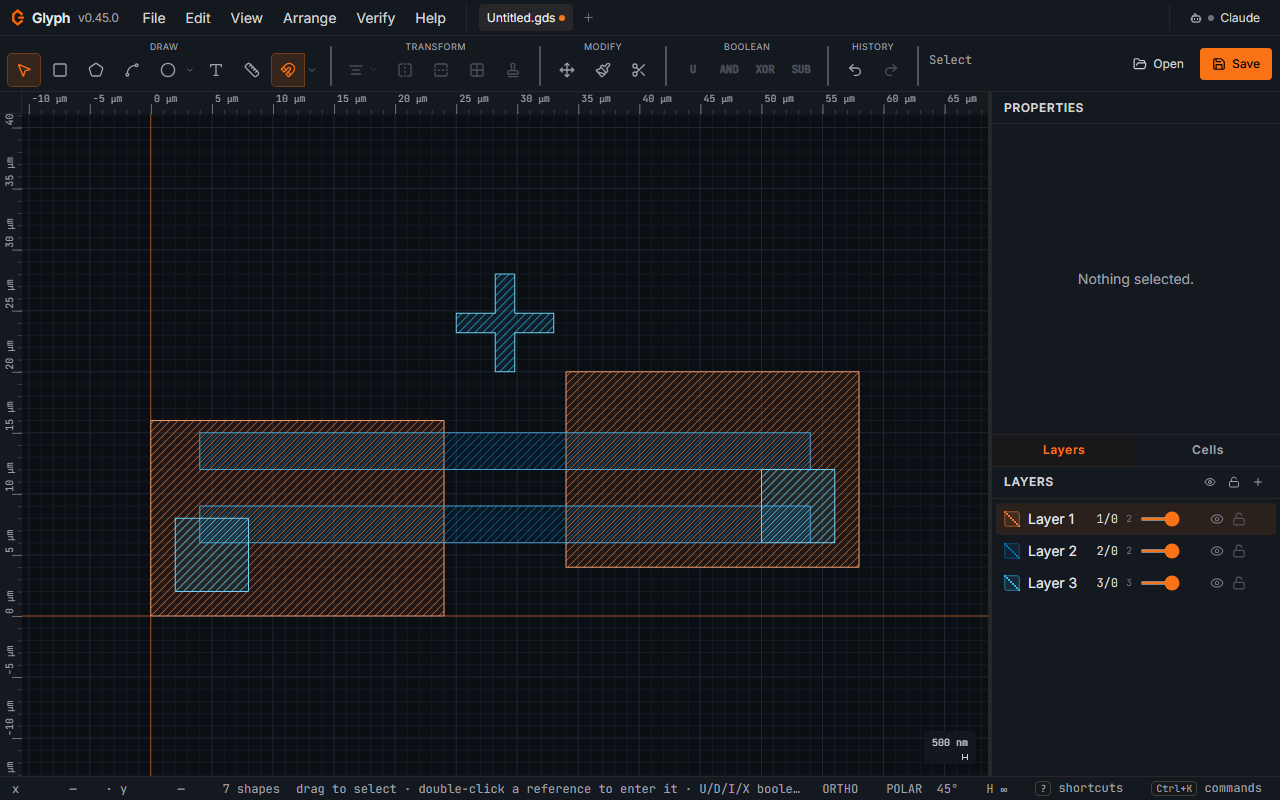
- Menu bar (top): File / Edit / View / Arrange / Verify / Help. On a narrow window — or a
normal one at a high browser zoom — the bar gives way rather than pushing the app sideways:
below ~780 px of layout width the "Glyph" wordmark and version drop to the logo alone, and
below ~620 px the six menus fold into a single
☰button that lists them all — hover a row, or click it, or focus it and pressEnter,Spaceor→(←steps back out). Nothing becomes unreachable by mouse OR keyboard, and the page itself never scrolls horizontally. Each folded menu is capped to the window height and scrolls, so a long menu (File, Edit, Arrange) keeps every command reachable on a short window too. If Claude holds a folder grant, the bar degrades one step earlier and the pill's folder chip shrinks to its icon — the folder name stays in its tooltip and in the pill's popover — so the chip and the unread badge are never cut off the edge. A greyed-out menu item's tooltip names the reason it's disabled right now, instead of leaving you to guess. With the keyboard, the arrow keys stop on a greyed item too; a small line beside it shows the reason, and a screen reader reads it; Enter does nothing there. The canvas right-click menu and the toolbar's Boolean and Align flyouts work the same way. After you run a command from a menu or a toolbar flyout (Boolean, Align, Circle/Arc) with the keyboard, focus goes back to the canvas, so the next key reaches the drawing; Escape instead returns you to the button that opened it. - Tab strip: one tab per open file.
[+]spawns a blank document;×closes. Switch tabs to edit a different document; the clipboard is shared across tabs so you can copy/paste between them. The browser tab's own title follows the active document (chip.gds — Glyph, with a leading●while it has unsaved changes). Tabs are keyboard-operable:Tabto a tab,←/→(andHome/End) to walk the strip,EnterorSpaceto switch — or run Next tab / Previous tab from the command palette (Ctrl+K). - Toolbar: grouped into Draw, Transform (the Align dropdown, Flip horizontally / vertically, Rotate +90°, Array, Flatten text), Boolean, Modify, History. Each group has a small label above it; when the toolbar row is scrolled and a group is only partly in view, its label slides to stay readable, or is hidden if it cannot fit whole (its buttons keep their own names). The Boolean group is a single flyout icon listing Union / Difference / Intersect / XOR with their hotkeys — select 2+ shapes, then click a row, press
U/D/I/Xdirectly, right-click for the context menu, or useEditin the menu bar. - Canvas (left and center): the drawing surface.
- Right panel: Properties on top, the editable numeric properties of whatever is selected; below it four tabs — Layers, Cells (the hierarchy), Objects (the active cell's own shapes and references) and Results (findings from a check, a diff or imported markers). Below 580 px of window width the right panel is not a column: it opens over the canvas from the toolbar's Panels button (the panel icon at the right end of the toolbar), so the canvas keeps the whole width.
- Component library (left edge, only while it is open from the toolbar's Library button). On a window too narrow to hold both side panels and a canvas, the panels are squeezed (the wider one first) so the canvas never disappears; the width you dragged is remembered and comes back when the window widens. The same holds vertically: on a window too short to keep a working canvas the toolbar gives way first (every tool keeps its letter key and its command-palette entry), then the hint line, so the drawing surface never collapses to a sliver. Both come straight back as the window grows.
- Hint line (just above the status bar): what the current tool expects next, and — while you are inside a cell — an
Editing <cell> — Esc to go backbreadcrumb. - Status bar (bottom): cursor coords, save target (where
Ctrl+Sgoes —Not savedfor a fresh document with nothing to lose,Unsavedonce it holds edits no file has,Downloadedafter a Save that could only download a copy (this browser gives Glyph no file to write back to), the file's name once Save writes back to one; each word names one state, and a dot beside it means unsaved edits — orOpened from CIF/DXF/GDS/ … for a file opened without a writable handle or one Glyph will not overwrite in place; hover it to see what Save writes instead), counts, aMarker N of Mchip while review markers exist (N/Mon a narrow window — F2 steps it), live measurement, and theORTHO/POLAR/ hierarchy-level toggles. The cursorx, yread-out shows exactly the precision the current zoom can resolve — the decimals follow the zoom, so a wafer-wide view reads2740 µmrather than a false2740.11 µm, and at 1 nm per pixel the same read-out shows fractional nanometres. Ruler tick labels follow the same rule. - Scale bar (bottom-left corner of the canvas): a live yardstick that spans a whole number of grid cells — as many as fit in about 60–100 screen pixels — and states that length in your display unit; the rule is always an exact multiple of the current snap step. When one grid cell is already wider than the bar, the bar shows that single cell.
Keyboard / accessibility. Press Tab once from a fresh page load and the first stop is a Skip
to canvas link — activating it moves keyboard focus straight to the drawing surface, bypassing the
menu bar and the toolbar. The canvas shows a visible orange focus ring while it holds keyboard focus,
so you can always tell whether a key press will reach the drawing; a screen reader names it
"Layout canvas — <cell>", the cell you are editing. Open and Save are pinned
at the right end of the toolbar row and never scroll off, however narrow the window — they read as
data-loss risk if either ever vanished silently. Below about 1120 px of window width, the DRAW /
TRANSFORM / BOOLEAN / MODIFY tool groups scroll horizontally instead (on a tablet-width window, 480–1200 px,
Undo and Redo are pinned beside Open and Save; on a phone they scroll with the rest, and from 1200 px the whole toolbar fits): a chevron appears at
each edge that has a group off-view, naming what moved ("More · 2" plus, on hover, which groups),
and one click on it brings the next group fully into view — or roll the mouse wheel over the strip,
which scrolls it sideways. A group only partly in view keeps its label clear of the edge's fade, or
hides it rather than show a cut-off word. The Open and Save toolbar buttons name their shortcuts in their
tooltips (Ctrl+O / Ctrl+S), and follow any remap made in .
 View full image