Connecting Claude (optional)
Glyph can be driven by an external Claude client (Claude Desktop, Claude Code, Cursor, …) so the model can draw, place instances, and read geometry on your behalf. The bridge is off by default — you opt in by running a small local MCP server and clicking Connect.
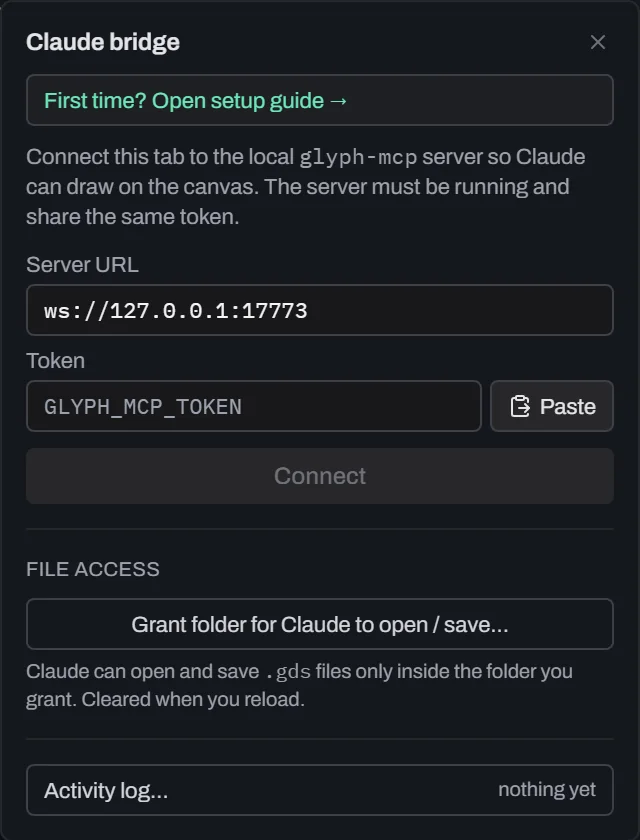
- The Claude pill at the right end of the menu bar shows the bridge's status: gray = disconnected, green = connected, amber = handshake / unauthorised.
- Click the pill, paste the token your installer printed, click Connect, then Allow in the first-use confirmation modal.
- Once connected, every tool call Claude makes appears as one undo entry — you can step back through Claude's work the same way you step back through your own.
- All traffic stays on
127.0.0.1:17773; nothing leaves your machine.
First time? Click the pill → "First time? Open setup guide →". On Windows you'll be offered a one-click installer download; the guide walks through running setup-claude.bat and pasting the generated token. macOS / Linux setup is documented in SETUP.md.
The Claude bridge covers most of the editor: it can add shapes, cells, SREFs, and AREFs; edit shapes and instances in place (update_shape, set_shape_layer, update_ref); transform geometry (translate / rotate / scale / mirror) and run booleans (union / intersect / xor / difference); manage layers (add / update / remove); copy cells; and read geometry. Reads are token-aware — Claude can ask for a cell summary (counts + bounding box) before pulling full point lists.
Multiple documents. If you have several tabs open, Claude can list them (list_tabs) and target a specific one — by switching to it (switch_tab) or by naming it on any tool call. The editor switches to that tab before acting, so you always see which document Claude is editing, and it can never silently draw into the wrong one.
Letting Claude open and save files. Claude cannot touch your disk by default. To allow it, open the Claude pill and click Grant folder for Claude to open / save…, then pick a folder. From then on — until you reload — Claude can list, open, and save .gds files inside that one folder only (never anywhere else, and never your other files). Opening a file always lands in a new tab, so it never overwrites what you're working on. Each save shows a toast so you see it happen. Click Revoke in the pill to cut off access immediately. This grant is deliberately separate from the drawing connection: connecting Claude lets it draw, but not read or write files until you grant a folder.
Guarding against overwrites. By default Claude may replace files inside the folder you granted — the grant is the permission. If you would rather be asked each time, turn on Ask before Claude overwrites a file in ; Claude then waits for your Allow/Deny and is told plainly if you decline. While any confirmation is on screen — Claude's or one of your own — Claude cannot open a file, switch tabs, or raise a second overwrite question; it is told to wait for your answer, so the question you are reading is never replaced under your pointer or answered for a different document. The refusal is recorded in the activity log.
Seeing where Claude is working. When a folder is granted, the Claude pill shows a folder glyph and the folder name — a writable grant is never hidden behind a click. The tab Claude last acted in is marked with a small robot glyph and flashes briefly each time it acts there, clearing after a minute of quiet.
What did Claude just do? Every open, save, overwrite, folder grant/revoke, and tab switch is recorded in a timestamped activity log. Open it from the Claude pill (Activity log…) or from ; an orange badge on the pill counts actions you have not looked at yet. Overwrites are listed distinctly from fresh saves and totalled at the end, so “did Claude replace anything?” has a definite answer rather than a toast you may have missed. The log is kept in memory for the session only — it is never written to disk.
See mcp-server/README.md for the full tool surface.