Measuring
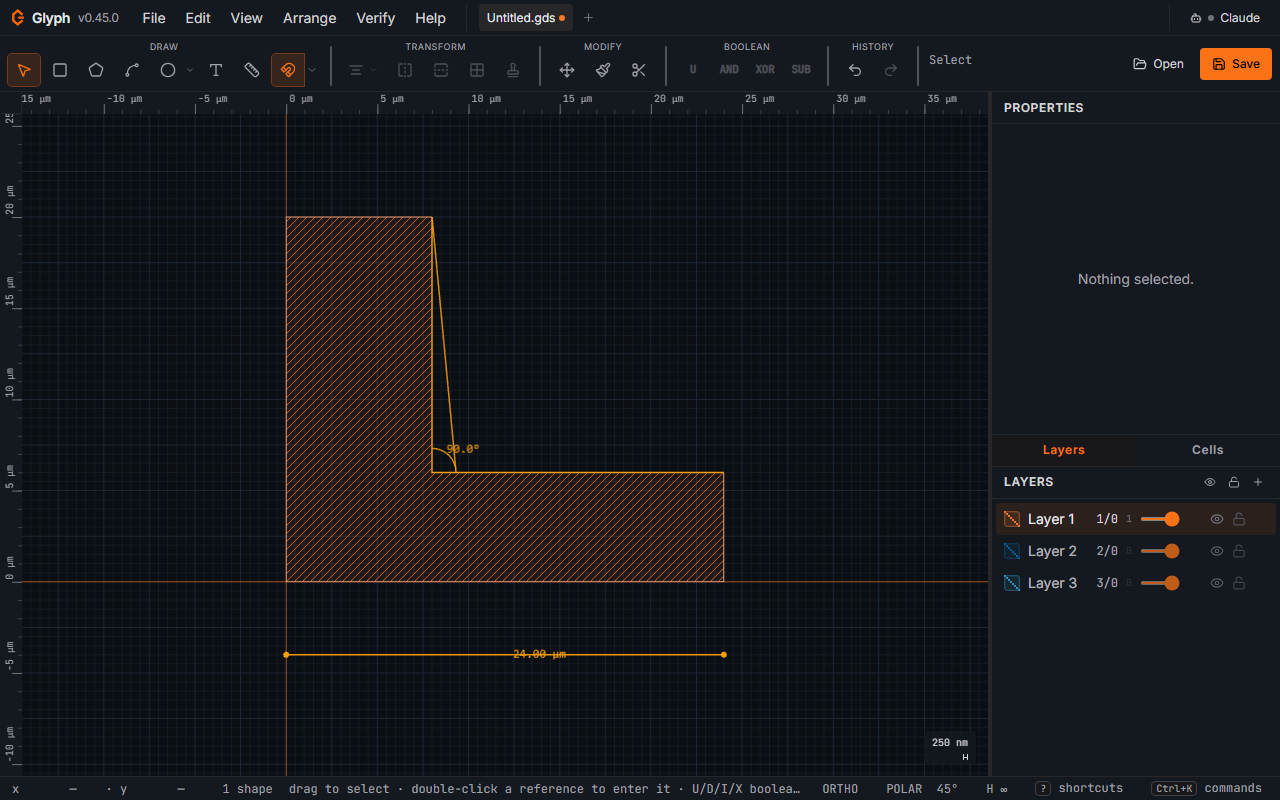
Press M to activate the Measure tool, then drag from point A to point B. The distance appears, in your display unit:
 View full image
- In the status bar (amber digits, right side).
- As a label at the drag midpoint on the canvas.
Switching to any other tool clears the measurement. No shape is ever created.
Keyboard-only (no pointer at all). With Measure armed and nothing collected yet, press Enter instead of clicking or dragging: it opens the same Dynamic Input HUD the draw tools use (Drawing modifiers) to type each point as an absolute x,y. Distance takes two typed points in a row (start, then end) — mirroring the drag exactly, right down to snapping the same way (below). Gap, Radius and Angle each take one typed point per click they'd otherwise need, and pin automatically on the last one, just like a mouse click would. Chain re-opens the HUD after every typed vertex, since it has no fixed count — to finish one you started this way, press Esc (drops back to a free cursor without cancelling the ruler, same as Esc mid-drag for the draw tools) and then Enter to pin it, exactly as the click-driven flow does.
Pin a measurement. Press Enter after a measure drag (or after typing its two points, keyboard-only) to keep it as a persistent dimension — a labelled distance line that stays on the canvas, survives tab switches and autosave, and is never written to the .gds (it's a draw-only aid, like construction geometry). Pin as many as you like. Its label sits on a dark chip, so it stays readable over the geometry it measures.
Measure an angle. arms a 3-click angle: click the vertex, then a point on each ray. The interior angle is drawn with an arc and a degree label, and pinned like a distance dimension. Esc cancels mid-collection.
The angle previews live as you go: click 1 drops a vertex dot, click 2 fixes ray 1 and rubber-bands ray 2 to your cursor with a running degree readout, and click 3 pins it. The reading you watch is the reading you get — it is computed exactly as the pinned dimension is.
Five measure modes. With the Measure tool active, the Properties panel shows a mode picker: Distance (drag), Angle (three clicks), Gap (two clicks on facing edges — the companion to a min-spacing violation), Radius (arc centre, then a point on the arc), and Chain (any number of clicks). The mode stays until you change it, so you can take several of the same kind in a row. Below it is a list of every dimension pinned in the cell — click a row to jump to it, or delete it there.
Measure a chain (multi-segment ruler). arms an unbounded click-collection: each click adds a vertex to the ruler, with a live rubber-band segment to the cursor and a running length label on every fixed segment so far. Press Enter (with at least 2 points clicked) to pin the whole polyline as ONE chain dimension — it draws each segment's length at its midpoint plus a cumulative total (Σ …) at the last vertex. Esc cancels the draft with nothing pinned; Enter with only one point clicked also pins nothing, so an accidental keypress mid-collection can't create a degenerate ruler.
Measuring snaps like drawing does: the same object-snap chain (vertices, edges, centres, intersections) guides both of the distance drag's endpoints (a start pressed within the tolerance of an edge lands on that edge) and the non-first clicks of Angle, Gap, Radius and Chain, with the same tolerance and the same settings toggles. The live angle-ray preview tracks the raw cursor; the click itself lands snapped. A typed point (keyboard-only, above) runs through the identical grid-snap and object-snap before it's placed, so it lands exactly where clicking or dragging to the same coordinates would. This deliberately differs from a typed draw/arc anchor (Drawing modifiers.1), which lands at exactly the typed value with no snapping at all — draw/arc trusts a typed point as already-precise intent, Measure treats it as equivalent to a click. Documented, not unified, absent a real complaint.
Delete just one. With the Select tool, click a pinned dimension’s line (or either ray of an angle, or any segment of a chain) to pick it — it turns white — then press Delete, or right-click and choose Delete dimension. Clicking anywhere else drops the pick.
A lasting record of a DRC run. Every design-rule check now also opens a report listing the violation count broken down by rule and layer, the cell and shape count checked, and whether paths were checked — so “how many, of what, where” survives the toast disappearing. Minimum-area limits are entered in µm², matching the width and spacing columns beside them.
Clear them all. removes every dimension in the active cell in one undo step. (All five modes — Distance, Angle, Gap, Radius and Chain — are shipped; see "Five measure modes" above.)